Marvel Rivals Tracker 2026: Stats, Rank & Match History
← Back to Marvel Rivals Characters List
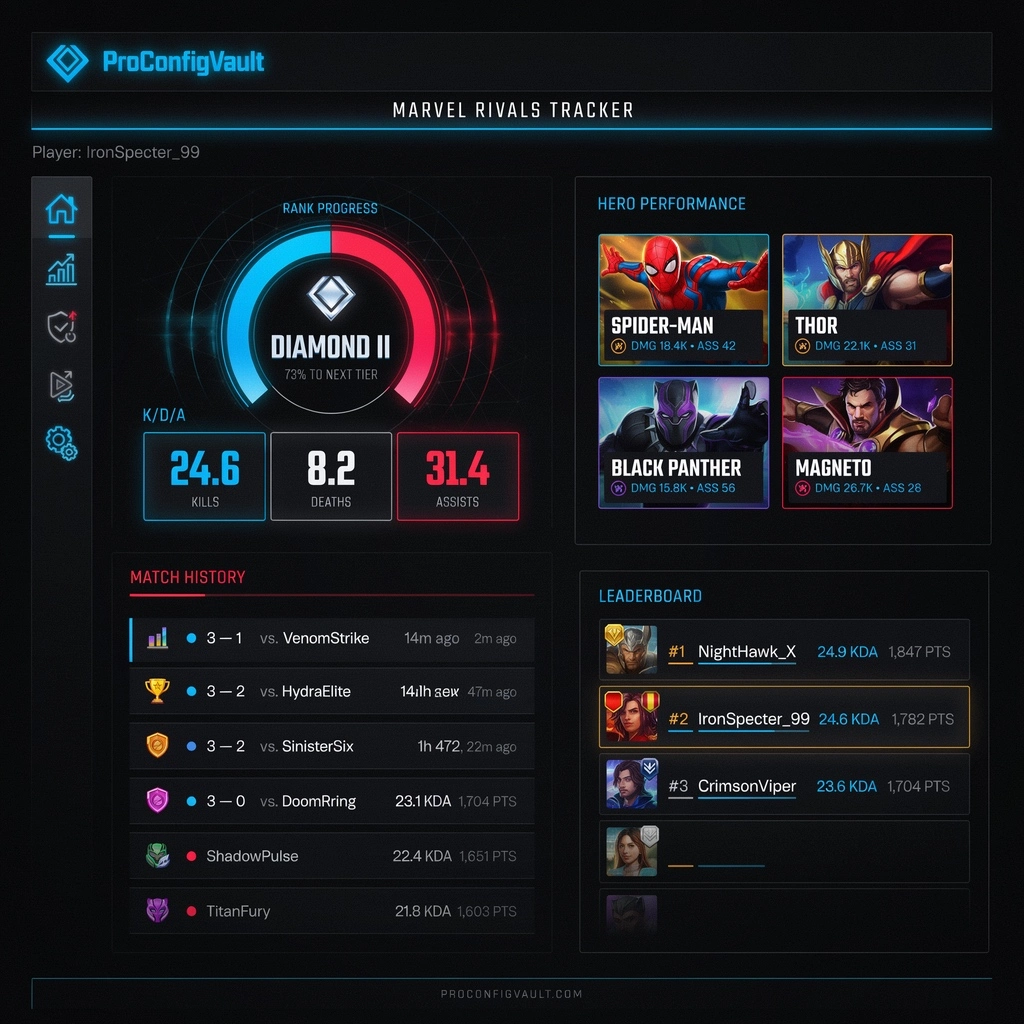
If you want to climb faster in ranked, a Marvel Rivals tracker can show exactly what is helping or hurting your performance. Instead of guessing after every win or loss, you can check real stats like rank progress, match history, win rate, KDA, hero performance, leaderboard position, and role-based results.
Marvel Rivals is a fast team-based shooter where small decisions decide fights. Your aim, hero choice, deaths, damage, healing, assists, objective control, and team composition all matter. A tracker helps you understand those details clearly. If your favorite hero is losing games, your stats will show it. If your support gameplay is carrying your team, your tracker will show that too.
This complete 2026 ProConfigVault guide explains how to use a Marvel Rivals stats tracker, what numbers to check first, how to understand your ranked progress, and how to use tracker data to choose better heroes, improve your crosshair, and win more matches.
Quick Answer: What Is a Marvel Rivals Tracker?
A Marvel Rivals tracker is a stats tool that helps players check rank, win rate, match history, KDA, hero stats, leaderboard position, and performance trends. It is useful for finding your best heroes, weak roles, losing patterns, and ranked improvement areas.
Marvel Rivals Tracker Quick Navigation
- What Is a Marvel Rivals Tracker?
- How to Use a Marvel Rivals Tracker
- Best Stats to Check
- Marvel Rivals Rank Tracker
- Marvel Rivals Hero Stats Tracker
- Marvel Rivals Leaderboards
- Why Your Tracker Profile Is Not Showing
- How to Improve Using Tracker Data
- FAQ
What Is a Marvel Rivals Tracker?
A Marvel Rivals tracker is an online tool that helps players review their performance data. Depending on the tracker, you may be able to check your player profile, rank, match history, win rate, KDA, hero statistics, leaderboard placement, and recent match trends.
This is useful because Marvel Rivals can feel very chaotic. You may think you played well because you got many eliminations, but your tracker may reveal that you died too early in every team fight. You may think your main hero is your best pick, but your stats may show that another hero has a much better win rate. A tracker helps separate feelings from facts.
For example, if you play Duelist and have high damage but low win rate, you may be shooting tanks too much and not finishing important targets. If you play Strategist and have high healing but many deaths, your positioning may be the real problem. If you play Vanguard and lose often, your timing may be off even if your damage looks good.
That is why a Marvel Rivals tracker is not only for checking numbers. It is a practical improvement tool for ranked players.
How to Use a Marvel Rivals Tracker
Most Marvel Rivals tracker tools work in a simple way. You search for your player name, open your profile, and review the available stats. Some tools also include leaderboards, rank history, hero performance, and desktop app features.
- Open a trusted Marvel Rivals tracker website.
- Search your player name or profile ID.
- Open your player profile.
- Check your rank, win rate, KDA, and match history.
- Compare your most-played heroes with your best-performing heroes.
- Look for repeated problems such as high deaths, low win rate, or weak role performance.
- Use the data to adjust your hero pool, crosshair, and ranked strategy.
One popular external option is Tracker.gg Marvel Rivals, which provides player stats and leaderboard-style data. You can use tracker information together with ProConfigVault guides to improve your hero choices and settings.
For example, after checking your stats, compare your best heroes with our Marvel Rivals Characters List and our Marvel Rivals Tier List.
Best Marvel Rivals Stats to Check
A tracker can show many numbers, but not every number is equally important. If you want to improve quickly, focus on stats that explain your real impact in team fights.
| Stat | Why It Matters | What to Look For |
|---|---|---|
| Win Rate | Shows how often you win with a hero or role | Stable win rate over many games |
| KDA | Shows eliminations, deaths, and assists | Low deaths with steady impact |
| Hero Stats | Shows performance on specific characters | Best heroes vs most-played heroes |
| Match History | Shows recent results and trends | Loss streaks, role issues, map problems |
| Rank Progress | Shows competitive movement | Whether changes are helping you climb |
| Leaderboard Position | Compares you with other players | Useful for high-rank and competitive goals |
The most important thing is not one single stat. The real value comes from reading the pattern. A high-damage Duelist with too many deaths may still be costing the team. A Strategist with average healing but very low deaths may be more valuable than a healer who farms numbers but dies first every fight.
Marvel Rivals Rank Tracker
A Marvel Rivals rank tracker helps you follow your competitive progress over time. Ranked improvement is not always visible after one or two games. You can lose a close match but still improve your positioning, survival, healing, or damage efficiency.
When checking your rank tracker, do not only ask, “Did I rank up?” Ask better questions:
- Am I winning more on one role than another?
- Do I lose more when playing solo queue?
- Which heroes give me the best rank progress?
- Are my deaths increasing when I play aggressive characters?
- Am I losing because of low damage, low healing, or poor objective control?
If your rank is not improving, your tracker can show what needs attention. If your win rate is high on Strategist but low on Duelist, it may be smarter to climb using support heroes while practicing Duelist in quick play. If your KDA is strong but your win rate is low, you may be getting kills that do not actually win objectives.
Marvel Rivals Hero Stats Tracker
The most useful part of a Marvel Rivals tracker is often the hero stats section. This shows how you perform on specific characters. Many players are surprised when their favorite hero is not their best-performing hero.
Hero stats can help you answer important questions:
- Which hero gives me the highest win rate?
- Which hero do I die on the most?
- Which role gives me the most consistent results?
- Am I better on hitscan, projectile, melee, or support heroes?
- Which heroes should I practice before playing ranked?
If you want to choose a better main, compare your tracker data with our Marvel Rivals Characters List. That guide explains roles, beginner picks, and hero playstyles so you can match your stats with the right character pool.
Pro Tip: Do Not Judge Every Role the Same Way
A Vanguard should not be judged like a Duelist, and a Strategist should not be judged only by eliminations. Each role has different performance goals, so always read tracker data based on what your hero is supposed to do.
| Role | Stats to Watch | Improvement Goal |
|---|---|---|
| Vanguard | Deaths, objective time, space created, win rate | Create space without feeding |
| Duelist | Eliminations, final blows, deaths, damage | Secure kills without wasting lives |
| Strategist | Healing, assists, deaths, utility impact | Keep the team alive while staying safe |
Marvel Rivals Leaderboards
Marvel Rivals leaderboards are useful for checking top players, high-rank performance, and popular hero choices. If you want to improve, leaderboards can show which characters strong players are using and how competitive players build their hero pool.
Leaderboards are most helpful when you use them for learning, not only comparison. Do not feel discouraged if top players have much better numbers. Instead, ask useful questions:
- Which heroes are top players using often?
- Are they playing mostly one role or multiple roles?
- Which characters appear often in the current meta?
- Do high-rank players use safer heroes or high-skill heroes?
- Which hero choices match my own skill style?
You can combine leaderboard research with our Marvel Rivals Crosshair Codes page. A clean reticle can help with tracking, target visibility, and confidence during messy fights.
Marvel Rivals Tracker App vs Website
Some players prefer a tracker website, while others prefer a tracker app. Both can be useful, but they are not the same. A website is usually better for quick profile lookup and post-match review. A desktop tracker app may offer extra features, depending on platform support.
| Tracker Type | Best For | Notes |
|---|---|---|
| Website Tracker | Profile lookup, stats, leaderboards | Best for quick review |
| Desktop Tracker App | Live tracking and overlay-style features | Usually best for PC players |
| Mobile Review | Checking stats away from PC | Useful for match history review |
If you only want to check your stats after matches, a website is enough. If you want live tools, check whether the tracker supports your platform before installing anything.
Why Your Marvel Rivals Tracker Profile Is Not Showing
Sometimes a Marvel Rivals tracker cannot find your profile or does not update your stats correctly. This does not always mean the tracker is broken. There are several common reasons why your profile may not appear.
- Your profile privacy settings may block public tracking.
- Your player name may be typed incorrectly.
- Your stats may not have updated yet.
- The tracker may only show players who have been searched before.
- Platform or region data may take time to sync.
- Some tracker features may be limited to supported platforms.
If your profile does not appear, check your in-game privacy settings first. Make sure your profile can be viewed publicly if you want third-party tracker tools to find your stats. Then play a match and search again later.
How to Improve Using Marvel Rivals Tracker Data
A tracker is only useful if you turn the data into action. Do not just look at the numbers and close the page. Use the information to make better ranked decisions.
1. Find Your Best Role
Compare your win rate across Vanguard, Duelist, and Strategist. If you win much more on one role, that role may be your best way to climb. You can still practice other roles in quick play, but ranked should focus on your strongest impact.
2. Reduce Deaths First
Many players focus only on eliminations, but deaths often decide matches. If you die early every fight, your team loses pressure, healing, damage, or frontline control. Use your tracker to see which heroes cause the most deaths and fix your positioning.
3. Compare Favorite Heroes vs Winning Heroes
Your favorite hero is not always your best hero. If your favorite hero has a poor win rate after many matches, move that character to practice mode or quick play until your performance improves.
4. Track Match History After Changes
When you change your crosshair, hero pool, sensitivity, or role, check your match history after ten games. One match is not enough data. Ten matches gives you a better idea of whether the change helped.
5. Use Tracker Data With Tier Lists
A tier list shows what is strong in the meta, but your tracker shows what is strong for you. The best ranked pick is usually where meta strength and personal performance meet.
Ranked Improvement Checklist
- Check your top three heroes by win rate.
- Check which hero has the most deaths.
- Compare your best role with your favorite role.
- Review your last ten matches, not only one bad game.
- Fix one problem at a time: deaths, hero pool, crosshair, or positioning.
Best Marvel Rivals Tracker Tips
- Check stats weekly, not after every loss. One bad match does not define your progress.
- Focus on your best three heroes. A small hero pool is easier to improve.
- Track deaths carefully. Fewer deaths usually means better ranked consistency.
- Review match history after losing streaks. Look for repeated mistakes.
- Do not copy top players blindly. Their hero pool may not match your skill level.
- Use clean crosshairs. Better visibility can improve tracking and confidence.
- Compare stats by role. Vanguard, Duelist, and Strategist need different performance goals.
Recommended ProConfigVault Resources
After checking your stats, use these ProConfigVault guides to improve your setup and hero choices:
- Marvel Rivals Crosshair Codes — copy clean reticles for Duelist, Vanguard, and Strategist heroes.
- Marvel Rivals Tier List — compare your tracker stats with the current meta.
- Marvel Rivals Characters List — learn every hero role and playstyle.
- Luna Snow Marvel Rivals Guide — improve your Strategist gameplay.
- Emma Frost Marvel Rivals Guide — learn a strong frontline hero.
- ProConfigVault Guides — browse more Marvel Rivals, Valorant, and CS2 guides.
Frequently Asked Questions
What is a Marvel Rivals tracker?
A Marvel Rivals tracker is a stats tool that helps players check rank, win rate, KDA, match history, hero performance, leaderboards, and competitive progress.
What is the best Marvel Rivals tracker?
The best Marvel Rivals tracker is one that clearly shows player stats, rank progress, match history, hero stats, and leaderboard data. Tracker.gg is one popular external option for Marvel Rivals stats.
Can I check Marvel Rivals player stats?
Yes. If profile data is available, tracker tools can show stats such as rank, win rate, KDA, hero performance, and recent match history.
Why is my Marvel Rivals tracker profile not showing?
Your profile may not show because of privacy settings, incorrect player name, delayed stat updates, platform limitations, or because the tracker has not indexed your profile yet.
Does Marvel Rivals tracker work on console?
Some web-based tracker features may support profile lookup, but app or overlay features may be limited by platform. Check the tracker’s support page before installing anything.
What stats should I check to improve in Marvel Rivals?
The most useful stats are win rate, deaths, KDA, match history, hero performance, rank progress, and role-based results. These numbers help you find your best heroes and weakest habits.
Is a Marvel Rivals tracker useful for ranked?
Yes. A tracker is useful for ranked because it shows whether your hero choices, role selection, and gameplay habits are helping you climb or holding you back.
Final Thoughts
A Marvel Rivals tracker is one of the best tools for players who want to improve with real data. It helps you understand your rank progress, hero performance, match history, win rate, KDA, and role impact instead of relying only on feelings after a win or loss.
Use tracker data to find your best heroes, reduce unnecessary deaths, choose better ranked picks, and compare your performance with the current meta. Then combine that information with a clean crosshair, a strong hero pool, and smart team composition.
If you want to improve faster, start by checking your Marvel Rivals stats, choose two or three heroes that perform well for you, and track your progress over the next ten ranked matches. The numbers will show you what to fix next.